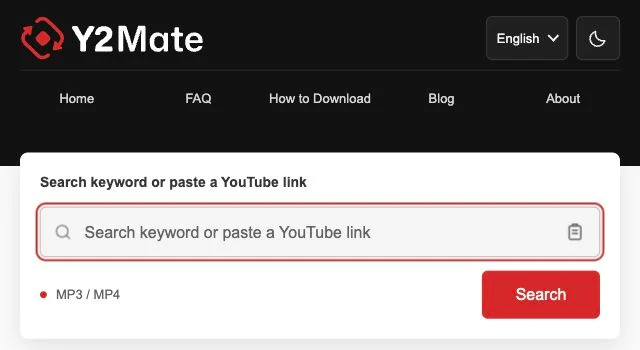
Welcome to Y2Mate, a browser-based YouTube downloader and converter for MP3 music files and MP4 videos. Keyword search helps you find a video, while a YouTube Link takes you directly to its conversion choices. This YouTube Downloader connects selection, conversion and browser saving in one workflow, with available downloads determined by the source, third-party service availability and any applicable restrictions.
Trending
The local chart is temporarily unavailable. Search for a title or artist above.
Enter a title, artist or other identifying keywords and press Search to see matching videos. For a specific video, paste its YouTube Link into the same search field and press Convert.
Choose Your Video and MP3 or MP4 Format
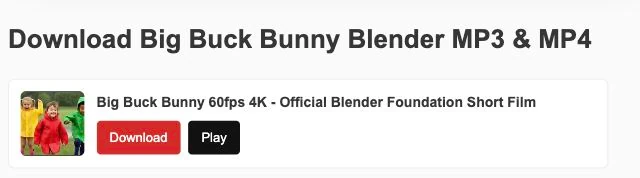
Select the intended search result, then inspect the formats offered for that video. Choose MP3 for listening or MP4 for viewing, with a bitrate or resolution from the available choices.
Download the Prepared File
Use Download when the prepared file becomes available, then allow the browser to handle saving. Check its download progress and destination before closing the page or starting another request.
Y2Mate Converter Search and Download Controls
Use One Search Field for Keywords and YouTube Links
You can change from music search to a specific YouTube Link without switching forms. Clipboard paste may request permission; declining it still leaves manual paste available through your keyboard or touch menu.
Find Music with Trending and Related Songs
Trending charts provide another starting point when you have not chosen a track. Trending Download starts a song search, whereas Download beside a related song opens conversion for that selection.
Choose a Light or Dark Browser Interface
Use the light or dark appearance that makes labels and controls easiest to read. Browser width affects the arrangement on smaller screens, but changing appearance does not change download formats or quality.
YouTube to MP3 Converter for Music and Spoken Content
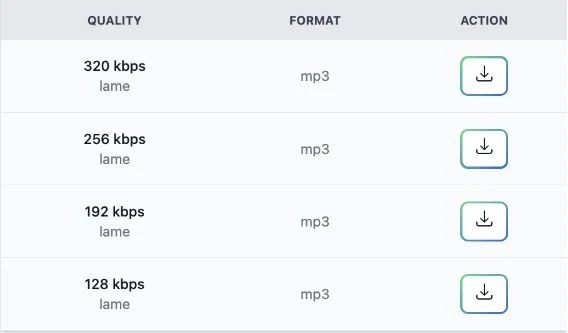
A YouTube Mp3 Downloader saves the listening portion without retaining the video. MP3 320kbps, 256kbps and 128kbps may be offered, depending on the source and conversion service options. For a comparable duration, higher bitrates generally require more storage; 128kbps favors compact files, while 256kbps offers a middle choice. A higher setting cannot restore missing detail, so base your MP3 download on the material rather than the largest number alone.
YouTube to MP4 Downloader with Available Resolution Choices
Use a YouTube Mp4 Converter when the visual content matters, such as a demonstration with on-screen instructions. MP4 choices may include HD resolutions of 1080p and 720p, plus 480p, 360p, 240p and 144p, depending on the source and converter. Smaller resolutions can reduce transfer size, while higher choices may preserve more visible detail. Not every video offers every resolution, and playback also depends on the saved file and your player.
Find Videos with Keywords or a Known YouTube Link
For keyword searches, distinguish the intended version with an artist, exact title fragment or channel name. Compare duration and creator details before opening a result, especially when several videos share a title. A known YouTube Link skips this search stage and opens conversion directly. Paste only the video's address, removing any surrounding message that arrived with a shared link.
Find Browser Downloads on Android, iPhone and Desktop
The Y2Mate Downloader works through browser controls without required software installation. On Android, check Downloads in the browser or file manager; on iPhone, inspect the browser's download list and its selected Files destination. Desktop browsers usually offer a downloads panel with a folder shortcut. Your browser settings determine where files go, so check the destination and available storage before requesting a larger MP4 video.
Supported YouTube Link Formats
Recognized single-video YouTube Links include watch-page, shortened-share and embedded-video addresses. Each conversion handles one video. Recognition opens the converter but does not establish source availability or successful conversion.
Standard Desktop URLs:youtube.com/watch?v=VIDEO_ID
Shortened Share URLs:youtu.be/VIDEO_ID
YouTube Shorts URLs:youtube.com/shorts/VIDEO_ID
Mobile URLs:m.youtube.com/watch?v=VIDEO_ID
Embedded Player URLs:youtube.com/embed/VIDEO_ID
Is Y2Mate Safe to Use for Downloads?
Treat download pages and third-party advertisements with the same caution as other unfamiliar browser services. Keep your browser updated and its security protections enabled. Never provide a password, accept unwanted software installation or follow suspicious advertisements claiming your device needs repair. A request for unrelated permissions is a reason to stop and check the page; a familiar service name alone does not establish safety.
Troubleshooting YouTube Link and MP3 Conversion Problems
Before retrying a YouTube Link, open the source normally and check that the copied address is complete. If MP3 conversion returns an error, note whether it concerns access, availability or preparation. Temporary service trouble may require waiting rather than repeated submissions. If preparation succeeds but saving fails, inspect browser download permissions, available storage and your connection without disabling security protections or attempting to bypass restrictions.
Copyright Disclaimer
Disclaimer: Y2Mate is an independently operated YouTube downloader and converter. It is not affiliated with, endorsed by, or sponsored by YouTube or Google. YouTube and related names belong to their respective owners. References to those services describe compatible links and do not imply an official partnership.
Download only content that you own or have permission to save. Follow the applicable licence conditions, including attribution where required, as well as copyright law and YouTube's Terms of Service. Personal or non-commercial use does not automatically grant permission to copy or redistribute someone else's content.
Choose Download Quality and Organize Saved Files
Match the creator and duration to the version you want, especially for tracks with similar names. Choose a modest bitrate for space-sensitive listening or enough resolution to read important video text. After saving, locate the file through the browser's downloads list and rename it clearly, retaining the MP3 or MP4 extension so it remains easy to identify.
Frequently Asked Questions About Y2Mate Downloads
What does Y2Mate do with a selected YouTube video?
Y2Mate is a YouTube downloader and converter that takes a selected video to available MP3 or MP4 conversion choices. Its search helps identify the source; a YouTube Link reaches that source directly. The YouTube Converter then relies on available conversion services to prepare a downloadable file.
How can I convert a selected video to MP3?
Search for the video or paste its YouTube Link, confirm the selection, and choose MP3 from the offered formats. Pick an available bitrate and request conversion. Once a file is ready, use Download and check the browser's progress list to see whether saving has finished.
What does it cost to use the website?
Browser use is free, although availability and usage limits can affect requests. Your connection provider may charge for data, and third-party pages may advertise paid services. Those offers are separate from the basic workflow; check any payment request carefully before accepting its conditions.
Is additional software or an extension necessary?
No additional software or extension is required for the browser workflow. Search, conversion selection and file saving use page and browser controls. An installer offered in another tab is not a necessary conversion step, so avoid adding unfamiliar software just to obtain an MP3 or MP4 file.
Can I use Y2Mate downloads on Android and iPhone?
Android and iPhone users can try the service in a current browser, with saving behavior varying by browser and settings. On Android, open the downloads menu; on iPhone, check the chosen Files folder. If tapping a file starts playback instead, inspect the browser's available saving controls.
Which MP3 quality settings might be available?
The YouTube Mp3 Converter may offer MP3 bitrates of 320kbps, 256kbps and 128kbps, depending on the source and conversion service. Quality remains constrained by the original material. For long listening sessions, compare file size with your storage budget rather than assuming the highest offered bitrate is necessary.
How do I choose an MP4 video format?
Choose MP4 when you need the moving visuals as well as the music or speech. Select from the resolutions actually offered, balancing readable detail against download size. MP4 identifies the file container, not a fixed resolution, and playback support can vary with the player and encoding used.
Why is a YouTube Link not working in the converter?
A YouTube Link may be incomplete, copied with extra text or associated with a removed video. Recopy the address from the intended video and confirm that it opens normally. A recognized address can still lead to unavailable or restricted material; correcting its spelling cannot remove an access restriction.
What should I check when MP3 conversion cannot finish?
If MP3 conversion fails repeatedly, first check the displayed error and whether the source remains accessible. A service interruption may call for a later attempt. When conversion finishes but transfer is interrupted, inspect storage and browser download status instead of submitting the same video again immediately.
Which precautions make browser downloading safer?
Avoid advertisements that imitate download controls or demand urgent device repairs. Never enter your password or approve an unexpected installer, and keep browser security warnings active. Before opening a saved file, check that its type matches your selection. These precautions reduce exposure without establishing that every third-party interaction is safe.
Do I need a YouTube account to start conversion?
No YouTube account is needed, and you do not need to sign in for the site's search and conversion workflow. Do not supply credentials to a redirected page claiming to unlock a file. Videos that require special authorization may remain inaccessible to the converter.
How do copyright and permission affect downloads?
Check copyright permission, applicable law and YouTube terms before saving or reusing material. Permission to watch does not necessarily include permission to download, redistribute or edit it. Use content you own or are authorized to save, and confirm that the intended use falls within the relevant rights and conditions.